
ICIS - News
Designing a modern news authoring experience
for ICIS editors
Project snapshot
Role: UX designer, end-end discovery and design
Team: Product Owner, Engineering Lead, UX Lead
Platform: Canvas CMS
Focus: News authoring workflows, editorial review, featured articles
About ICIS
ICIS (Independent Commodity Intelligence Services) is a global provider of market intelligence for the energy, chemicals, and sustainability sectors. Its customers include traders, analysts, procurement teams, and strategic decision-makers who rely on accurate market data, pricing insights, and breaking news to make informed business decisions.
ICIS journalists and editors produce a high volume of specialised news covering commodities such as oil, LNG, gas, power, petrochemicals, and fertilisers. These stories provide critical context around supply disruptions, price movements, and geopolitical events that directly affect global markets.
For customers, speed and reliability of information is essential. For journalists, this means having tools that allow them to write, edit, review, and publish news quickly while maintaining editorial quality and accuracy.

Project goal
ICIS News currently relied on a legacy system for authoring, managing, and delivering news content, called Ada, developed over many years, which became difficult to maintain, and inconsistent.
As part of an investment programme, Content Convergence, legacy platforms were scheduled for decommissioning by the end of 2025.
The goal of this project was to design a modern news authoring workflow within the Canvas platform, enabling ICIS editors and reporters to create and manage news articles using a unified system.
Canvas is a composable content platform built on a micro-frontend architecture, designed to support modular content creation using reusable content blocks and tools.
The key objectives of the project were to:
Migrate news authoring workflows from legacy systems such as Ada
Ensure functional parity so editorial teams could continue working without disruption
Simplify and standardise publishing workflows
Leverage Canvas components to support structured, reusable content creation
Provide a scalable foundation for future editorial features
Key design considerations
Aligning with Canvas platform
Canvas is built around reusable content tools, structured content blocks, and established publishing workflows.
Rather than introducing completely new interaction patterns, I prioritised solutions that leveraged existing Canvas functionality.
Preserving familiar editorial workflows, eg review queue
While aligning with the Canvas platform was important, it was equally critical to consider the workflows journalists were already accustomed to in the legacy Ada system.
Designing for speed in newsroom environments
Journalists often work under tight deadlines, especially when reporting on breaking news.
Because of this, many design decisions prioritised speed and clarity
Leveraging the Canvas design system
The Canvas platform already had a mature design system and component library, which allowed me to move quickly from early concepts to mid–high fidelity designs.
This allowed me to focus primarily on workflow design and editorial usability, rather than recreating basic interface patterns.
Part 1 - Understand
Stakeholder interviews
To understand the current editorial workflows and system constraints, I conducted interviews with key internal stakeholders including:
Product Owner
Head of Global News
Engineering Lead
UX Lead
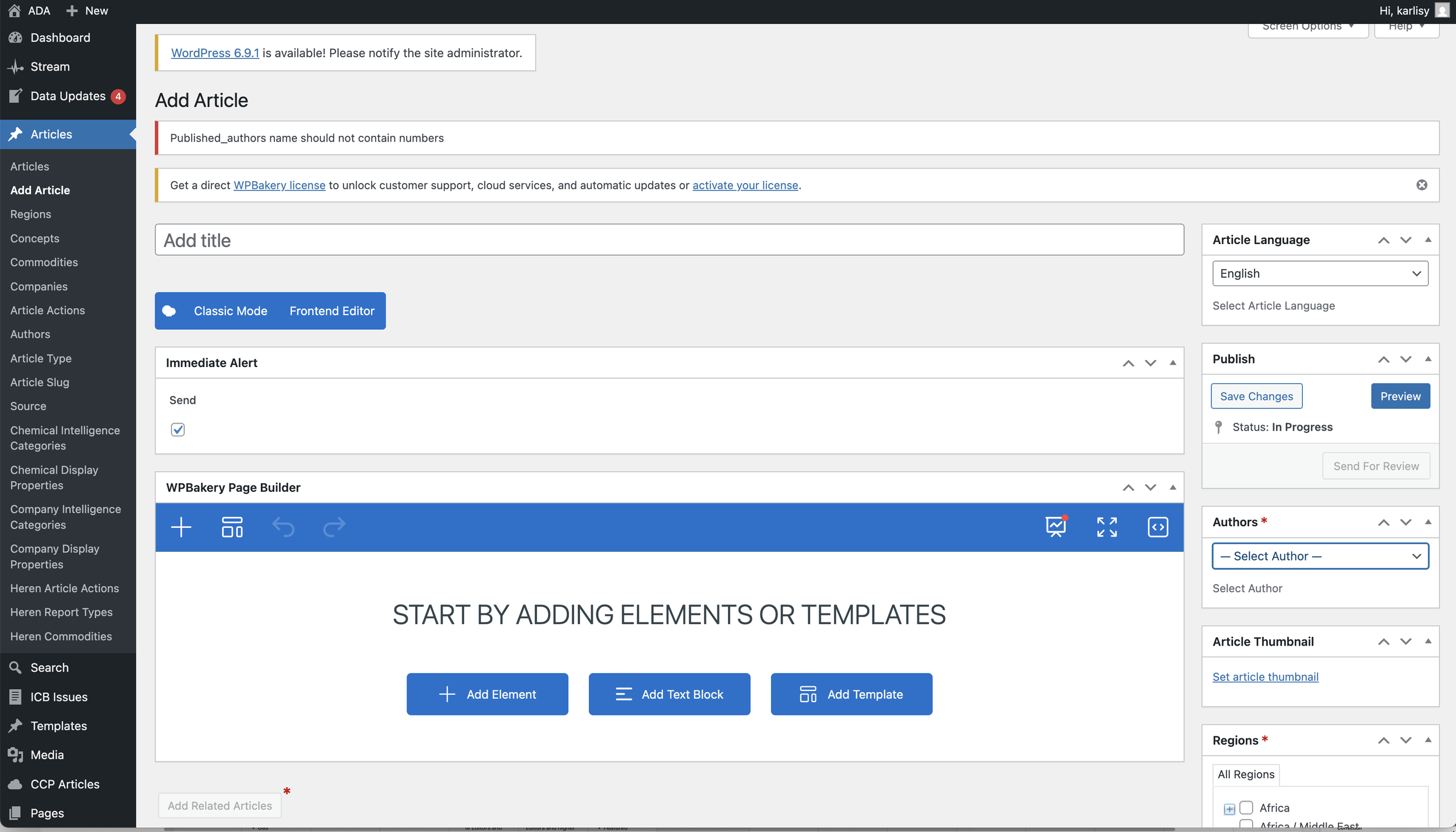
These conversations helped clarify how journalists and editors currently used Ada, what challenges they faced, and what functionality needed to be preserved during the migration.
A recurring theme was the importance of speed and reliability in the editorial workflow. Reporters need to publish breaking news quickly, while copy editors must ensure accuracy and consistency before articles go live.
Understanding these operational pressures helped inform design decisions around workflow structure, editing states, and review permissions.
Mapping existing and future workflows
After gathering stakeholder insights, I mapped the current end-to-end editorial workflows used in the legacy systems.
This included:
Article creation
Editing and revisions
Copy editing and review
Publishing
Post-publication corrections
Mapping the existing workflows helped identify:
Redundant steps created by legacy systems
Opportunities to simplify the editorial process
Key requirements that needed to be preserved for operational continuity
These insights were then used to define future workflows within Canvas, aligning the authoring experience with the platform’s modular content model.
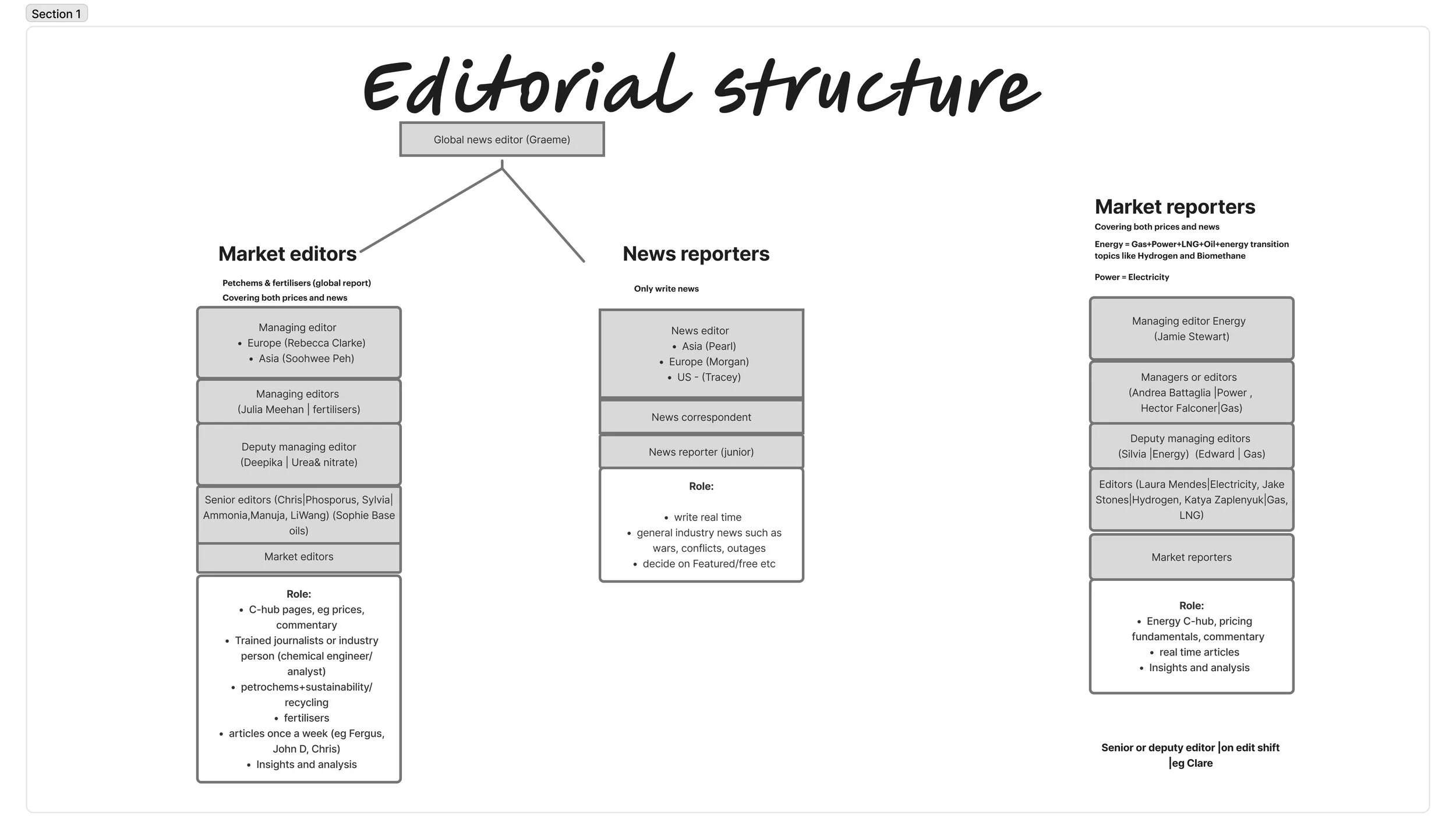
Understanding editorial users
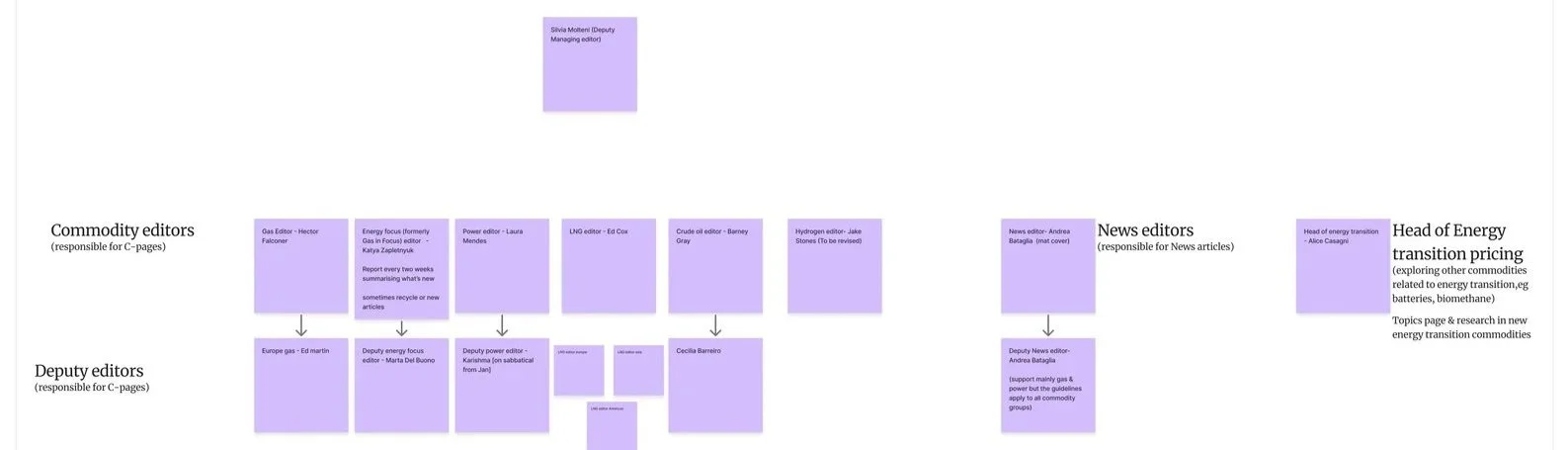
The news authoring platform serves a number of internal editorial roles, each with distinct responsibilities.
Key user groups included:
Newsdesk team
Responsible for coordinating news coverage and managing publishing priorities.
Market reporters
Journalists specialising in specific commodities such as energy, gas, power, LNG, and oil. Their primary focus is producing timely and accurate market news.
Market editors
Editors responsible for reviewing and refining stories, particularly within sectors such as petrochemicals and fertilisers.
While ICIS had already developed detailed user archetypes for external customers and subscribers, there had been little research focused on internal editorial users.
As a result, there was limited documentation describing:
how internal teams were structured
how editorial responsibilities were distributed
how different teams interacted within the publishing workflow
Over time, ICIS had grown through several acquisitions, and the organisational structure had evolved significantly. This meant that knowledge about editorial roles and remits had become fragmented, and even key stakeholders — including the Product Owner — did not always have full visibility of how different teams operated.
Mapping internal users and their responsibilities therefore became an important step in understanding the broader editorial ecosystem and ensuring the Canvas authoring workflows reflected real newsroom practices.

Competitor review
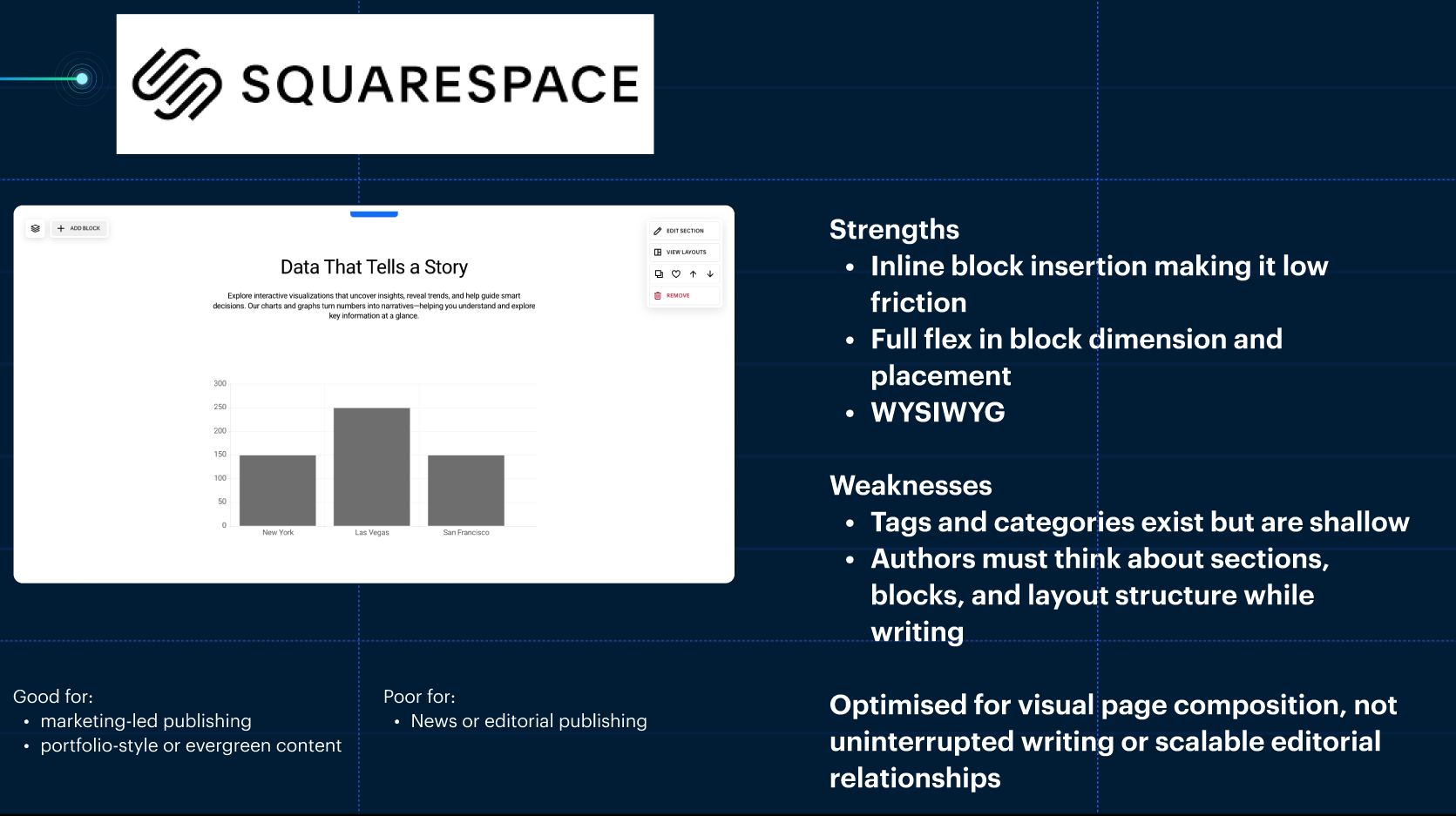
To identify opportunities for improvement, I conducted research into other editorial CMS platforms used by news organisations.
The review focused on:
Authoring interfaces
Editorial workflow models
Content structuring approaches
Publishing and review processes
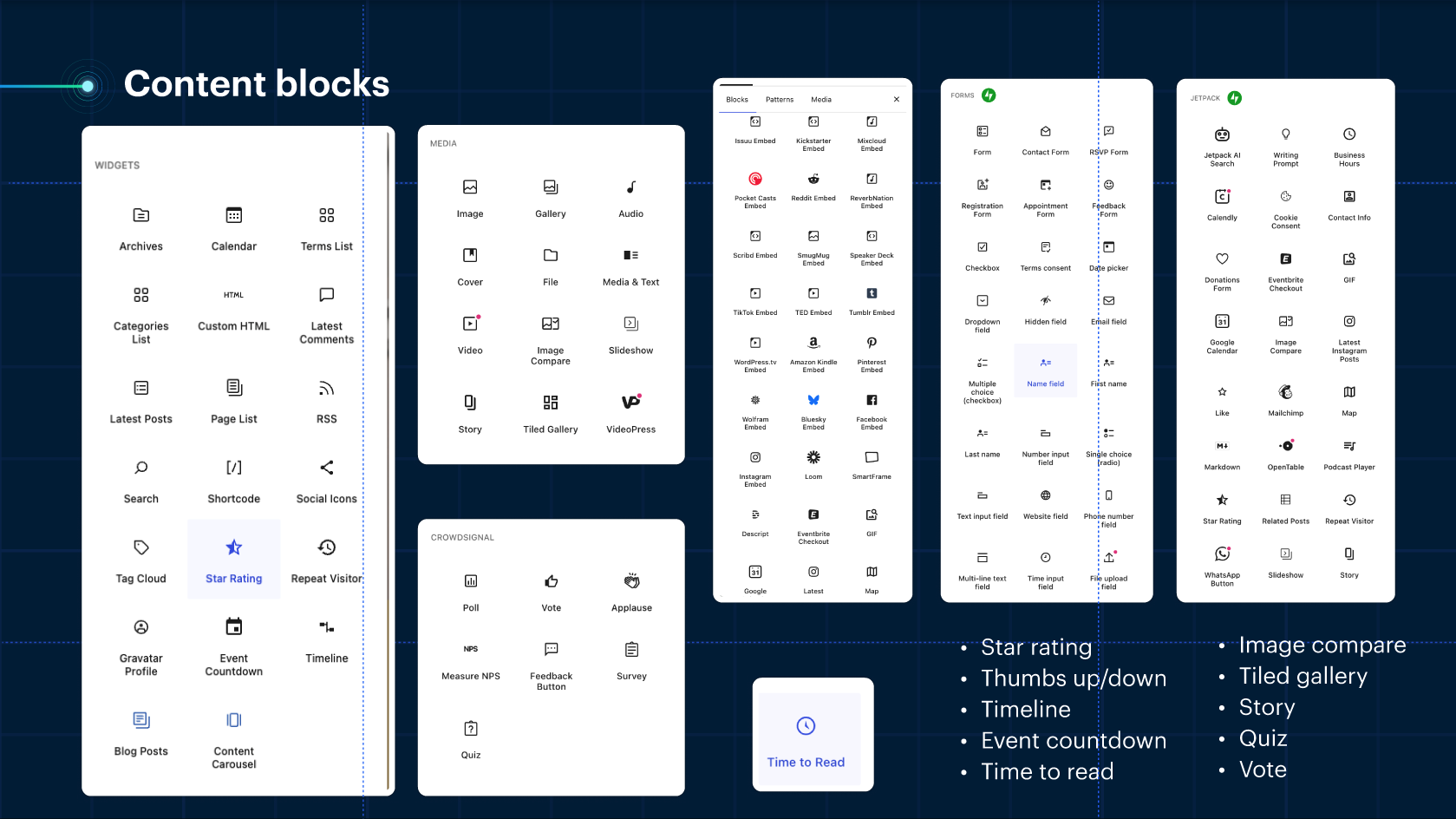
This research highlighted both strengths and limitations of existing tools, helping inform decisions around:
Workflow states
Structured content components (content blocks)
Editing experiences for journalists
Part 2 - Design
Defining the MVP
Working closely with the Product Owner, we defined the minimum viable product (MVP) for Canvas News Authoring.
The MVP needed to support the core workflows required for journalists to write, review, and publish news articles while ensuring continuity during the migration from Ada.
Key MVP capabilities included:
Authoring articles using existing Canvas content components (text, video, tabs, links, etc.)
Defining editorial workflow statuses
Supporting article review by copy editors
Managing featured articles
Editing and correcting published content
Adding contributors to articles

Designing the News Authoring Experience
Once the MVP scope was defined, I focused on designing the core authoring experience that reporters and editors would use daily. The goal was to create a workflow that allowed journalists to write and publish news quickly while maintaining strong editorial oversight.
Because Canvas already had a well-established design system, I was able to move quickly from early concepts to mid–high fidelity designs. The system provided a mature library of reusable components, interaction patterns, and visual standards, which helped ensure consistency across the platform while significantly accelerating the design process.
Creating a new article
Because Canvas uses a modular content model, articles are built using structured content blocks rather than a single monolithic editor.
This approach enables:
greater flexibility when composing articles
reuse of content components across the platform
consistency across ICIS content types
When creating a new article, reporters can:
add and arrange content blocks
include multimedia elements
structure their story using predefined components
The goal was to balance editorial flexibility with platform consistency, ensuring reporters could work quickly while still aligning with Canvas’ component-driven architecture.
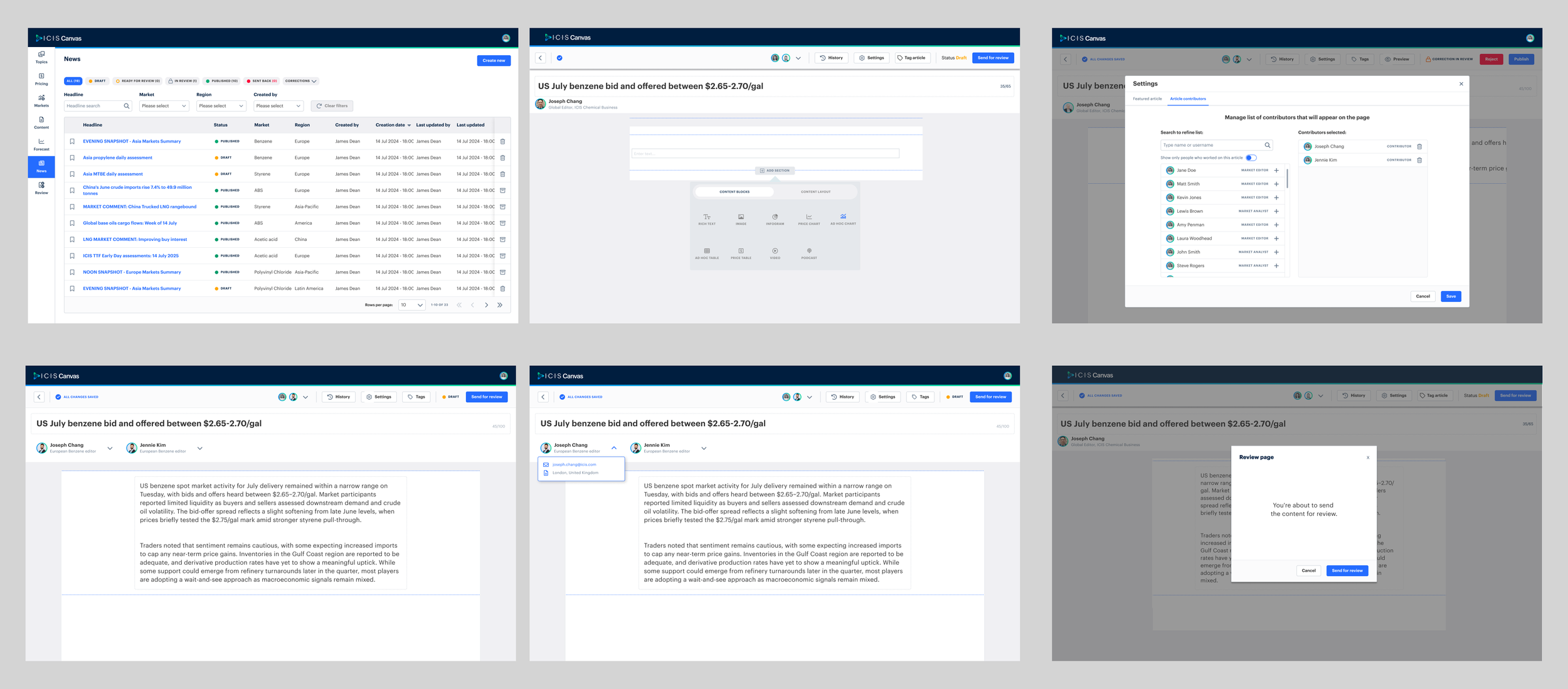
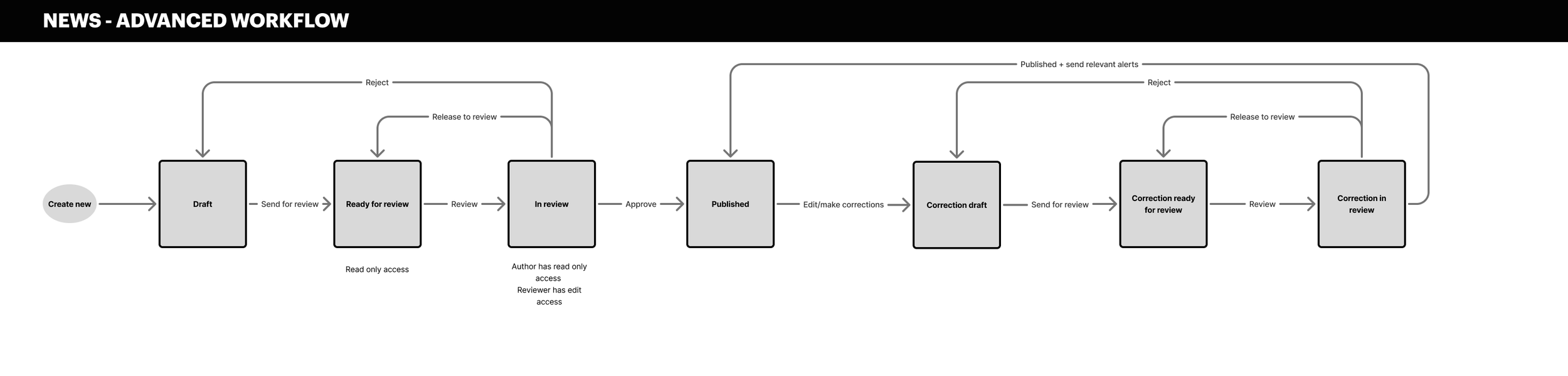
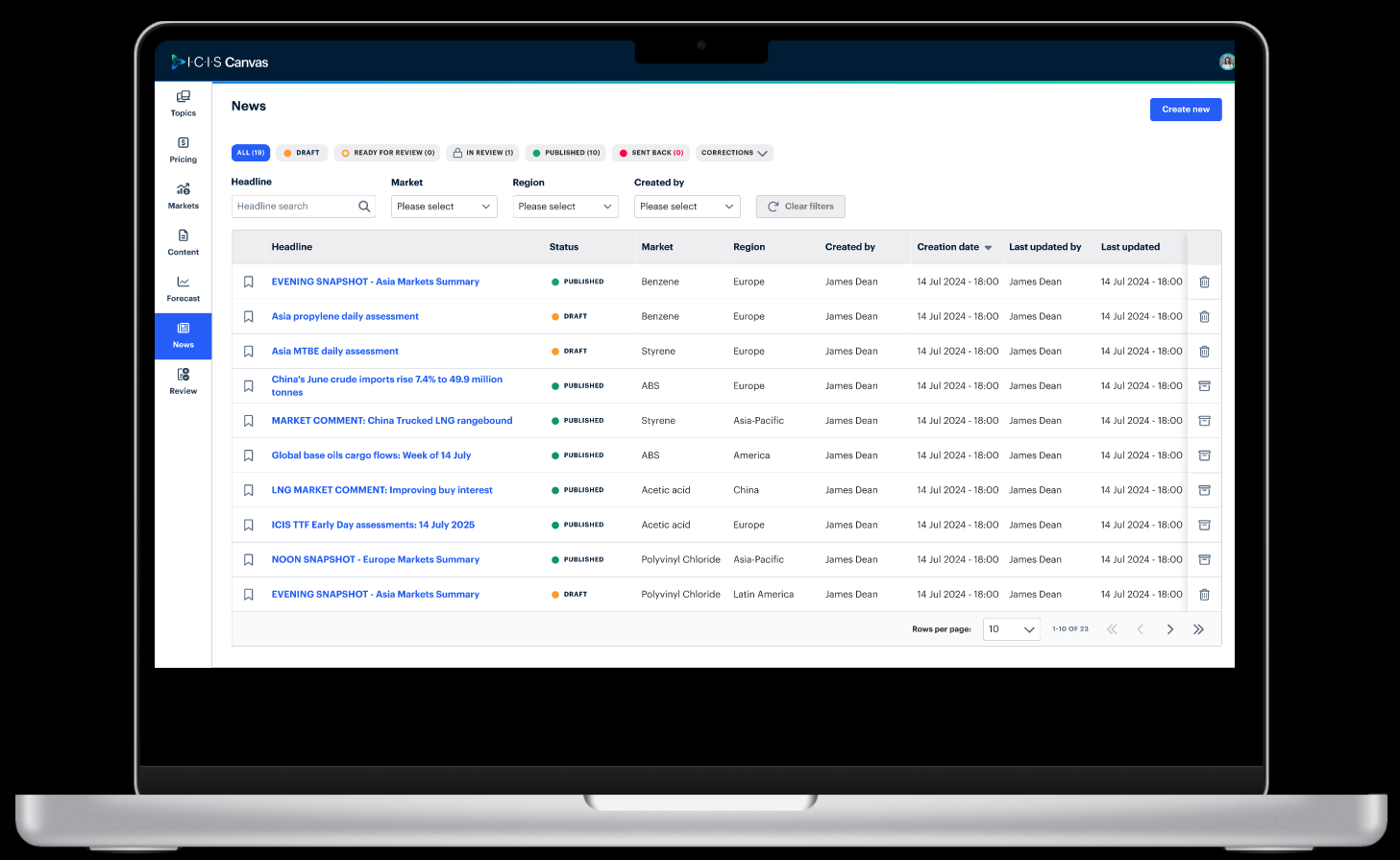
A key part of the design was defining the workflow states an article would move through before publication.
The proposed workflow included:
Draft
Ready for review
In review
Published
Each state was associated with specific user permissions to ensure editorial control and accountability.
For example:
Reporters could create and edit drafts
Copy editors could review and approve content
Approved articles could then be published
This structure helped create a clear and transparent publishing process.
Article review and editing
Before publication, articles typically go through a review process conducted by copy editors, often based in Singapore.
To support this process, the workflow includes clear editorial states:
Draft
Ready for review
In review
Published
These statuses help define ownership and accountability during the publishing process.
For example:
Reporters create and edit drafts
Editors review articles for accuracy and style
Approved articles can then be published
The Product Owner and I explored two potential approaches for how copy editors could access articles for review.
Review queue approach
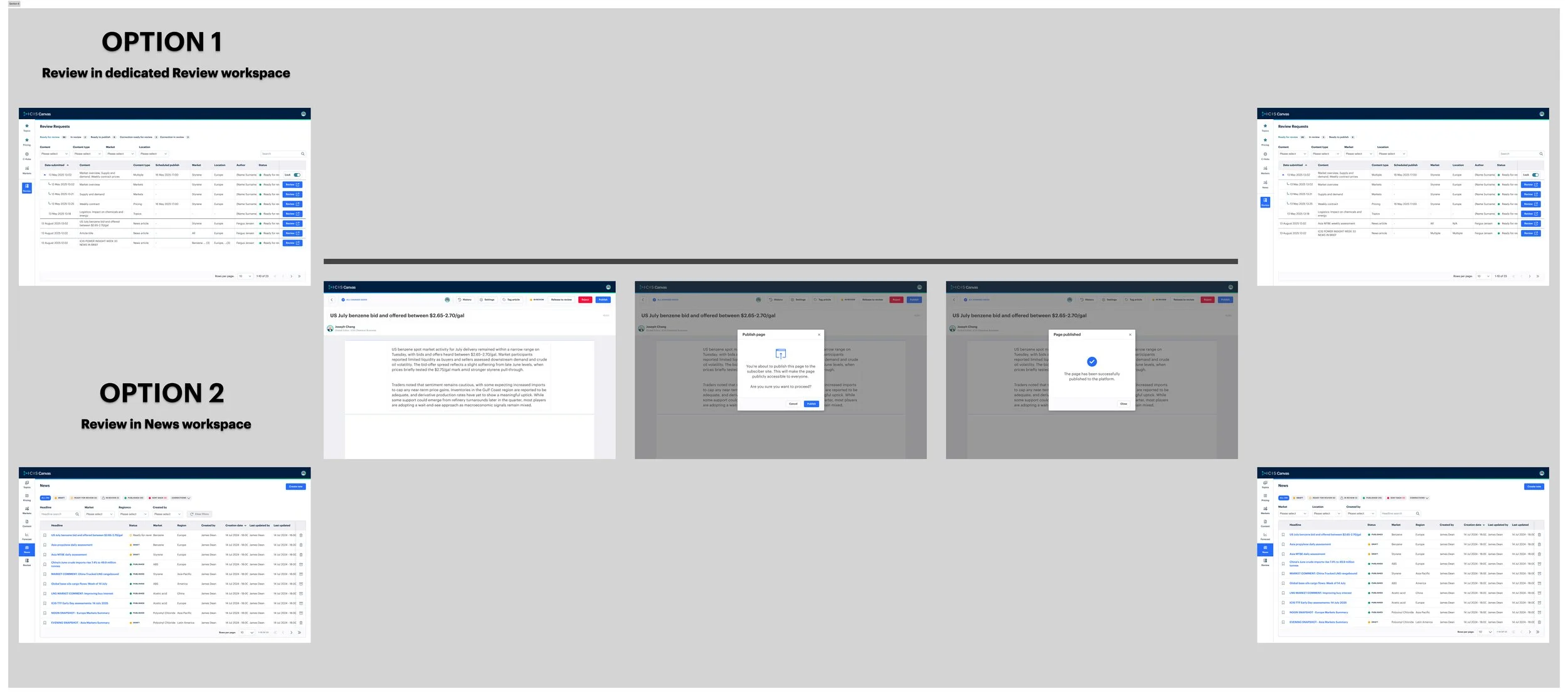
One option was to allow editors to review articles from a dedicated Review page, where all content items awaiting review would appear in a queue. This model aligns closely with how content moderation and review workflows typically function within Canvas.
Workspace access approach
The second option allowed copy editors to access articles directly from the News workspace, where articles were created and managed. This approach was closer to the way editors were already working in the legacy Ada system.
Exploring both approaches helped us evaluate the trade-offs between aligning with the Canvas platform model and preserving familiar editorial workflows for copy editors.
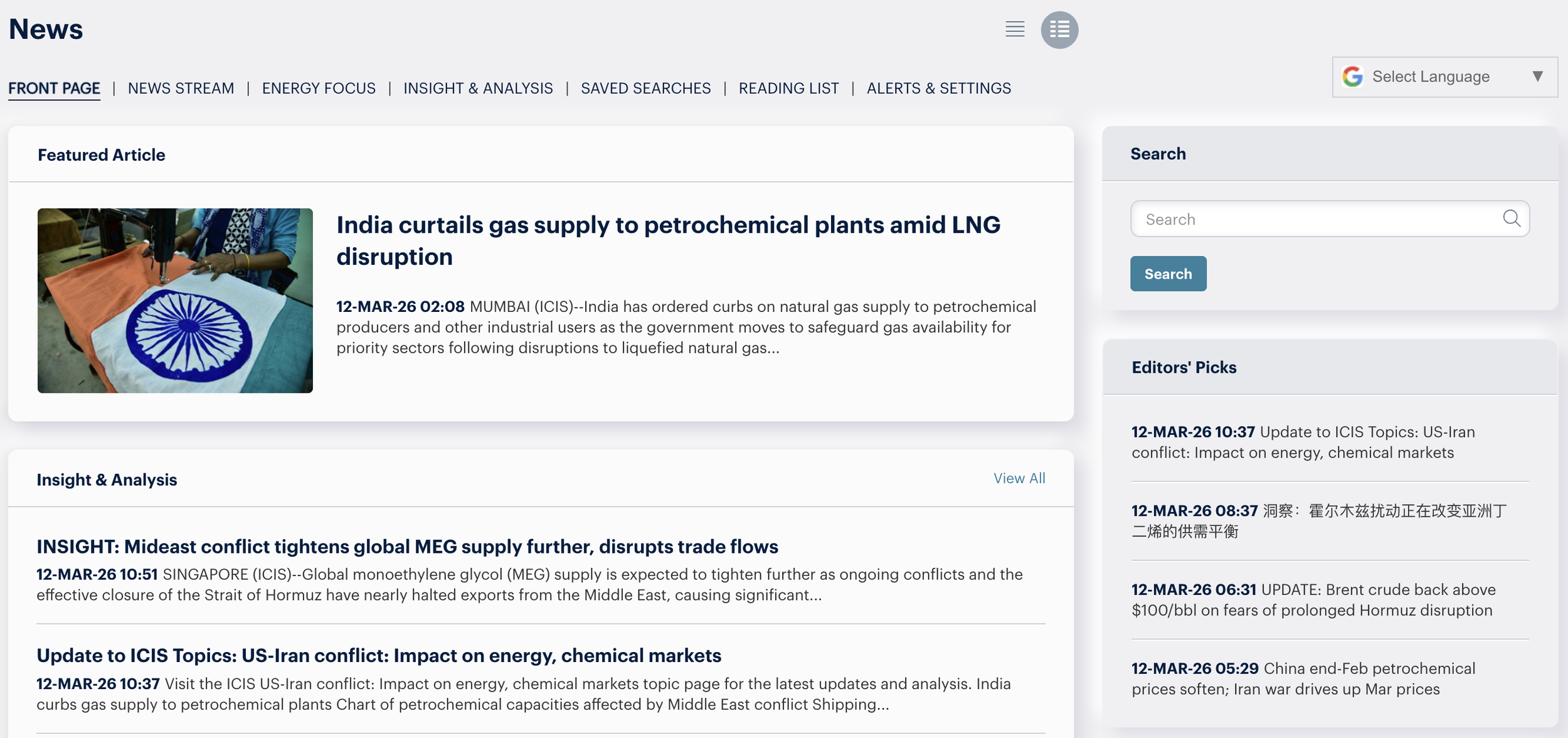
Featured article
Editors are responsible for designating certain stories as Featured articles in order to increase their visibility across the Clarity platform.
This decision can happen in two scenarios:
While composing a new article
After an article has already been published
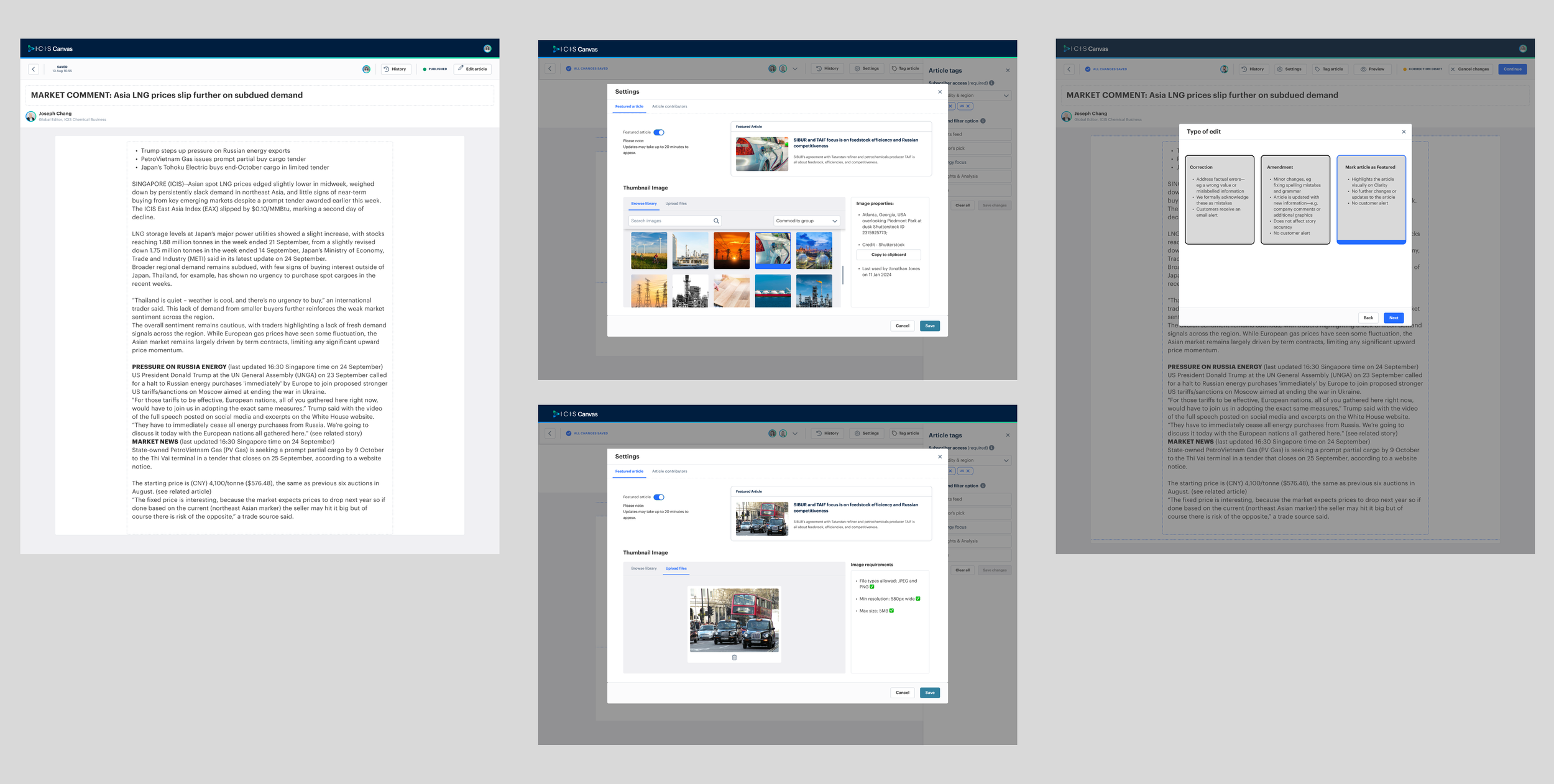
As part of the process, editors can also select a visual asset to accompany the story. This includes the ability to upload a new image or choose an existing image from the platform’s image library (functionality to be confirmed during development).
Marking an article as Featured increases its prominence on the Clarity platform, helping ensure important stories are surfaced to users quickly.
The goal of this feature was to allow editors to prioritise key stories without interrupting the normal authoring workflow.
Before exploring interface solutions, I first created a user flow that mapped how the Featured article process would work within the existing Canvas architecture.
Because Canvas already has established publishing workflows and content states, it was important that the feature aligned with the platform’s existing functionality rather than introducing a completely new interaction model.
Mapping the flow first ensured that the design would remain consistent with Canvas publishing patterns and editorial workflows.

Once the workflow was defined, I began exploring different ways the feature could be implemented within the authoring interface.
Because Canvas already provides several reusable publishing tools and workflows, I focused on exploring solutions that leveraged existing Canvas functionality wherever possible.
This approach ensured that:
the feature would remain consistent with the wider platform
development effort could be minimised
editors would encounter familiar interaction patterns
I created several design options that explored different ways of integrating the Featured article workflow within the authoring experience.
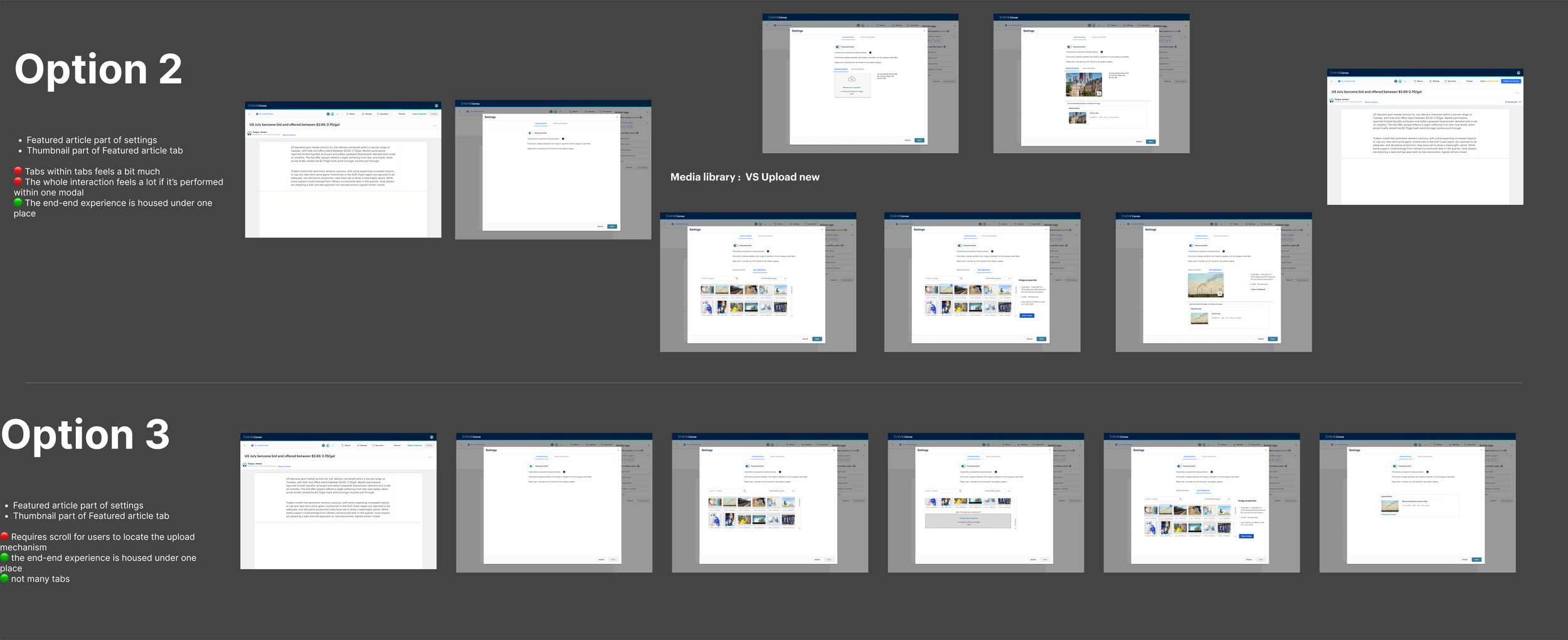
I presented the initial concepts during our weekly design critique session, where I received feedback from other designers and my design manager.
The feedback focused on:
reducing unnecessary complexity
aligning the interaction more closely with existing Canvas patterns
ensuring the process remained quick for editors working under time pressure
Based on this feedback, I refined the concepts and narrowed the exploration down to two viable design directions.
The refined concepts were then developed into higher fidelity designs that could be shared with stakeholders and used for further validation.
These designs were prepared for user testing with editorial stakeholders, allowing us to evaluate which approach best supported the editors’ workflow.
Part 3 - Feedback and iteration
Throughout the project, designs were continuously refined through a combination of internal critique sessions and usability testing with editorial stakeholders. This iterative approach ensured that the solutions aligned with both editorial workflows and platform constraints.
Internal team
Throughout the design process, I regularly presented work during UX critique sessions with peers and design leadership.
These sessions provided valuable feedback on:
Workflow clarity
Interaction patterns
Usability of the authoring interface
Based on this feedback, I iterated on the user journeys and screen designs to simplify the experience and reduce friction for journalists.
2. Usability testing
To validate the proposed workflows, I created interactive prototypes and conducted several rounds of usability testing with editorial stakeholders.
In total, we conducted four rounds of testing, focusing on key tasks such as:
creating and editing articles
marking articles as featured
managing contributors
reviewing articles prior to publication
The sessions helped reveal areas where workflows could be simplified or made more intuitive for editors.
The Featured article functionality required the most iteration. Early concepts created some uncertainty around when and how an article should be promoted to Featured status. Through multiple testing rounds and discussions with both the editorial and engineering teams, the design was gradually refined to better align with editorial expectations and technical constraints.
This iterative process ensured the final design approach was understood and supported by both users and delivery teams.
Project outcome and impact
Due to shifting organisational priorities, the project did not progress to development at that time.
However, the work provided a strong foundation for future Canvas editorial capabilities, including defined workflows, validated user journeys, and detailed design prototypes.
The project also contributed to the broader Content Convergence programme, which aims to unify ICIS content systems under the Canvas platform.
Design impact:
Defined the future Canvas news workflow — created end-to-end authoring, review, and publishing flows to support the migration from legacy systems such as Ada.
Aligned editorial, product, and engineering teams — interactive prototypes and workflow mapping helped stakeholders agree on how news authoring should function within Canvas.
Reduced risk for future development — design explorations and usability testing validated key workflows before engineering investment.
Personal takeaway
During this project, I began incorporating AI tools into my design workflow.
I used AI to:
Support ideation and exploration of design approaches
Assist with research analysis, create summaries and playback
Conduct competitor analysis
Refine microcopy and improve clarity within the interface
This helped accelerate early design exploration and improve communication within the product team.